
Free Quotation Formats for UAE Businesses
Download Professional Quotation Templates
Send accurate, VAT-ready quotations to your clients in minutes. Choose from a growing library of professionally designed quotation templates in Excel, Word, and PDF formats. Download, customise, and share, no sign-up needed.
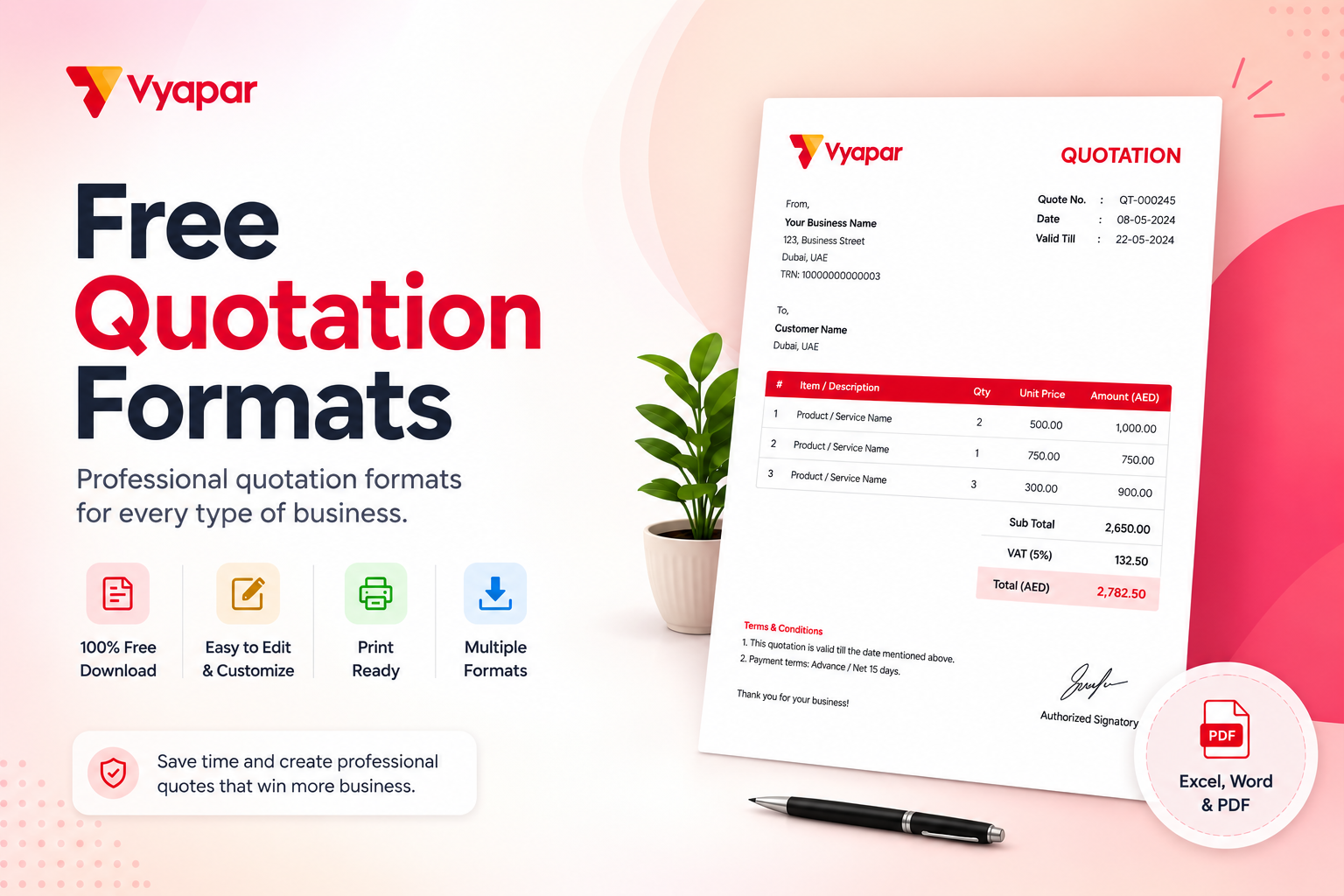
Quotation Templates
What is a Quotation Format?
A quotation format is a pre-designed layout that helps you send a formal price offer to a potential customer before confirming a sale. For businesses in the UAE, a well-structured quotation format outlines the products or services, prices, applicable VAT at 5%, and the validity period of the offer.
Quotation vs Invoice: What is the Difference?
A quotation is shared before a sale to propose pricing, while a tax invoice is issued after a sale to record it. A quotation is not a binding financial document, but a tax invoice is required for VAT reporting to the Federal Tax Authority (FTA). Using a clear quotation format sets accurate expectations and avoids disputes later.
Why Quotations Matter
A professional quotation improves your win rate, builds credibility, and gives clients confidence before they commit.
How to Create and Share a Quotation
Follow these simple steps to send a professional quotation in minutes.
Download Your Template
Pick a format that suits you. Excel is great for auto-totals, Word for easy editing, and PDF for a clean, locked copy.
Add Business and Client Details
Enter your business name, address, TRN, and logo, then add your client’s name, address, and TRN for B2B quotations.
List Products or Services
Add each item with description, quantity, unit, and rate. Apply 5% VAT where applicable and set the quotation validity period.
Set Terms and Conditions
Mention payment terms, delivery timelines, and the offer’s expiry date. Clear terms help avoid disputes and speed up approvals.
Review and Save
Double-check totals, VAT calculations, and client details. Export as PDF for a professional, non-editable copy.
Share on WhatsApp or Email
Send the quotation directly to your client via WhatsApp, email, or as a printed copy for meetings.
Key Components of a Quotation Format
Every professional quotation should include these essential elements.
Business Details
Your business name, address, contact details, TRN, and logo at the top of the quotation.
Client Information
The client’s name, billing address, contact number, and TRN for accurate B2B records.
Quotation Number and Date
A unique quotation number, issue date, and validity period to track and manage offers.
Item Description
Each product or service with description, quantity, unit rate, and line total for clarity.
VAT and Totals
Show the subtotal, VAT amount at 5%, and the grand total in AED for full transparency.
Terms and Conditions
Payment terms, delivery timelines, warranty details, and quotation validity to set clear expectations.
Benefits of Using a Professional Quotation Format
Faster Deal Approvals
Clear, well-structured quotations help clients decide faster, shortening your sales cycle.
Improved Brand Credibility
A branded, professional quotation builds trust and positions your business as reliable.
Fewer Pricing Disputes
Documented pricing, VAT, and terms reduce back-and-forth and prevent misunderstandings.
VAT-Ready Structure
Templates include the fields you need for the UAE’s 5% VAT, so conversion to a tax invoice is seamless.
Save Time on Every Deal
Reusable templates eliminate repetitive work and let you send accurate quotations in minutes.
Better Record-Keeping
Digital templates make it easy to store, retrieve, and reference past quotations at any time.
Frequently Asked Questions
Everything you need to know about quotation formats.
A quotation format is a pre-designed template used to send a formal price proposal to a customer before confirming a sale. It includes business details, item descriptions, prices, VAT, and validity terms.
No. A quotation is a pre-sale document that proposes pricing. An invoice is issued after the sale is confirmed and serves as a legal record for VAT reporting to the FTA.
If your business is VAT-registered, it is best practice to show the 5% VAT amount on quotations. This gives clients an accurate estimate of the final payable amount and makes converting the quotation into a tax invoice seamless.
Excel is ideal for auto-calculations, Word is best for easy editing and customisation, and PDF is preferred for sharing a clean, professional, non-editable copy with clients.
Yes. You can add your business logo, change colours to match your brand, and edit fields to suit your industry and business needs.
Yes. Once your client accepts the quotation, you can convert it into a tax invoice by adding the invoice number and issue date. With Vyapar App, this happens in a single click.


 (+971)-45490404



Billing software in India for small businesses

